How a Website Blocker Stops Your Brain From Wasting Hours Each Day

You’re Not Lazy – Your Brain Is Under Siege
You sit down to work. You have a clear goal. Within minutes, your hand reaches for your phone. You check a notification. Then another. Then you open a browser tab “just to look something up.” Forty-five minutes later, you are still scrolling.

Sound familiar? It is not your fault. Actually, it is not about willpower at all.
Studies show that the average person checks their phone an estimated 96 times a day. Each time you unlock your screen, your brain gets a tiny hit of dopamine. That is not an accident. Every app, notification, and infinite scroll is designed by experts to keep you hooked. Your brain is under siege from an entire industry built to capture your attention.
Distraction is not a personal failure. It is a design exploit. And the cost is huge. Every interruption steals your concentration and makes it harder to get back into deep work.
But here is the good news: you can fight back. A freedom website blocker app like Freedom lets you block the useless websites and apps that eat up your focus.
You set the rules. Your devices follow them. It gives your brain the space it needs to concentrate again.
If you want to understand how these digital traps work at a deeper level, check out this note on how your collaboration is being quietly hijacked by two different AI systems. It shows how invisible forces shape your attention every day.
And for practical tools to block distractions on your iPhone, explore the best pop-up blocker iPhone apps to stop distractions and improve focus. Taking control of your attention is the first step to reclaiming your time and your mind.
The Science of Distraction: Why Your Brain Keeps Losing Focus
Here is the thing your willpower never had a chance. Your brain is wired for survival, not for modern focus. And tech companies have figured out exactly how to hijack that wiring.
Every time you hear a notification ping or see a red badge, your brain releases a tiny burst of dopamine. That is the same chemical that makes you feel good when you eat chocolate or win a game. But apps use something called variable ratio reinforcement to make this even stronger. This is the same trick slot machines use. You never know when the next like, comment, or message will come. So your brain keeps checking, over and over, hoping for a reward.
Research explains how social media exploits this dopamine reward system through unpredictable rewards. Each time you unlock your phone, you get a small dopamine hit in anticipation. Over time, your brain learns to crave that feeling. That is why you pick up your phone without even thinking.
The cost goes beyond wasted time. Studies show that every interruption costs you up to 23 minutes to get back into deep focus. If you switch between tasks all day, your productivity drops by as much as 40 percent. Trying to multitask is like trying to juggle chainsaws. You end up dropping everything.
But here is the hopeful part. Your brain is neuroplastic. That means it can change. Every time you resist a distraction and stay focused, you strengthen the pathways that help you concentrate. Tools like a freedom website blocker app give your brain the breathing room it needs to rebuild those pathways. By blocking the useless websites and apps that pull you away, you let your attention span grow back stronger.
If you want to go deeper into the exact behavioral mechanism behind these reward loops, check out The Science of Gamification. It explains how designers use neuroscience to keep you hooked and how you can break free.
The Real Cost of Digital Distraction: Statistics That Will Make You Rethink Your Habits
You already know distraction feels bad. But the real numbers might shock you into action.
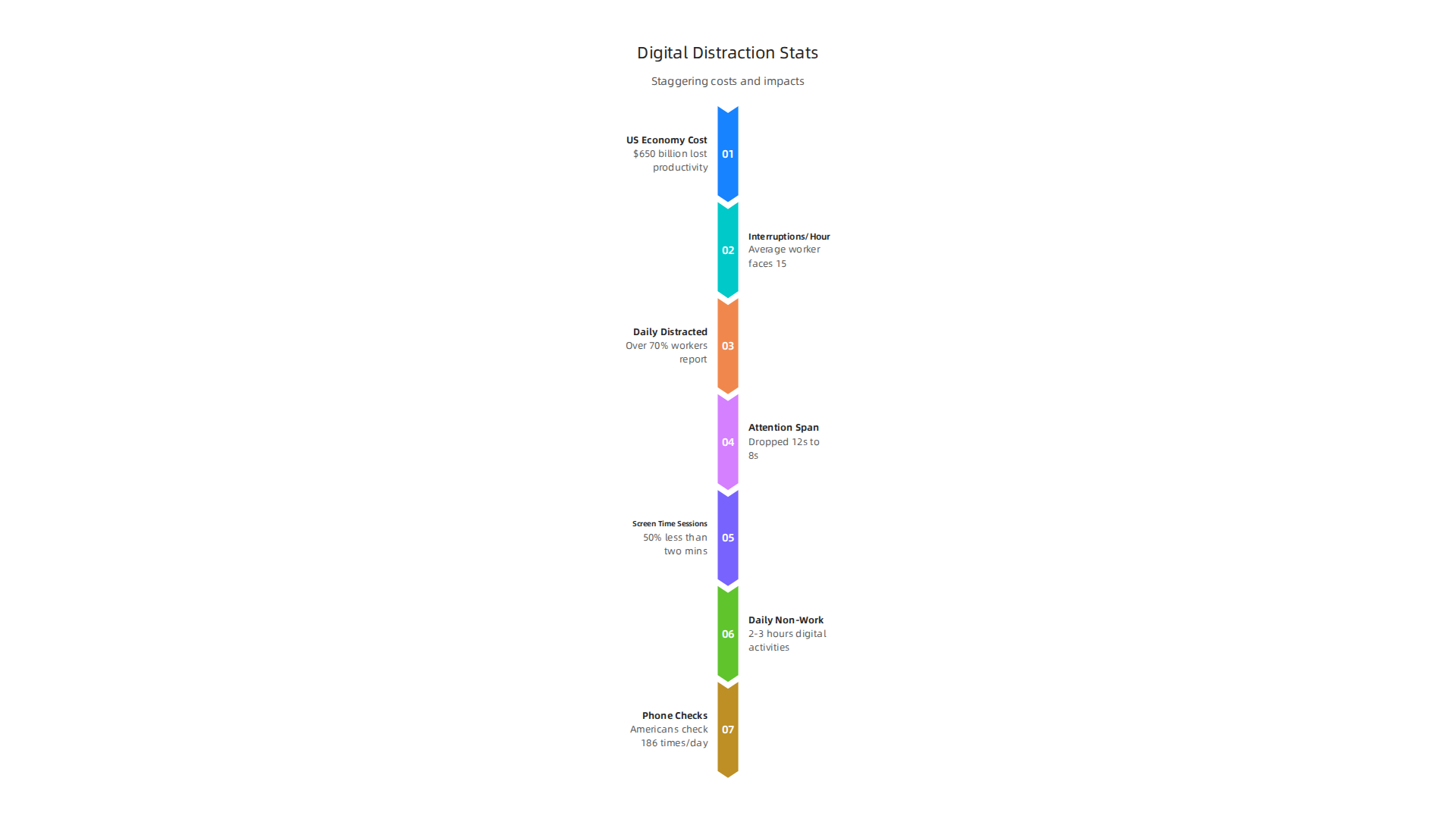
Let us start with the big picture. Research from 2026 shows that distractions cost the U.S. economy an estimated $650 billion every year in lost productivity. The average worker faces about 15 interruptions every single hour. That is one distraction every four minutes. No wonder so many people finish the workday feeling like they got nothing meaningful done.
Here is what that looks like for you personally. Over 70% of workers report feeling distracted on a daily basis. And attention spans? They are shrinking fast. Since the year 2000, the average human attention span has dropped from 12 seconds down to just 8 seconds. Studies on phone behavior confirm that 50% of screen time sessions last less than two minutes. Your brain has been trained to bounce away before you even realize it.
The daily time drain is huge too. The typical student or professional spends between 2 and 3 hours each day on non-work digital activities. That includes scrolling social media, bouncing between news sites, and checking apps that do nothing for your goals. Over a year, those lost hours add up to months of wasted time. According to recent stats on cell phone usage, Americans check their phones 186 times per day. That is nearly 200 chances to get pulled off task.
The technology keeping you hooked is no accident. It is built on purpose. The Value Reinforcement System (VRS), U.S. Patent No. 12,205,176 co-invented by Dean Grey, describes the exact mechanism platforms use to lock in your attention. Knowing how the system works is the first step to beating it.
So how do you fight back? You need tools that flip the script. The same way apps try to grab your focus, you can use technology to protect it. A freedom website blocker app removes the temptation before it ever appears. By blocking the useless websites that eat up your time, you give your brain the space it needs to actually focus on what matters. An auto blocker app works while you work, so you do not have to rely on willpower alone.
The numbers are clear. Distraction is costing you more than you think. But the good news is that you can take control starting today.
How Website Blockers Work: The Technology Behind Digital Discipline
You know the drill. You open your browser to do real work, your fingers type "fac" on autopilot, and suddenly you are on Facebook before your brain catches up. That split second between impulse and action is exactly where website blockers do their job.
Website blockers use a few different methods to stop you from reaching those useless websites.
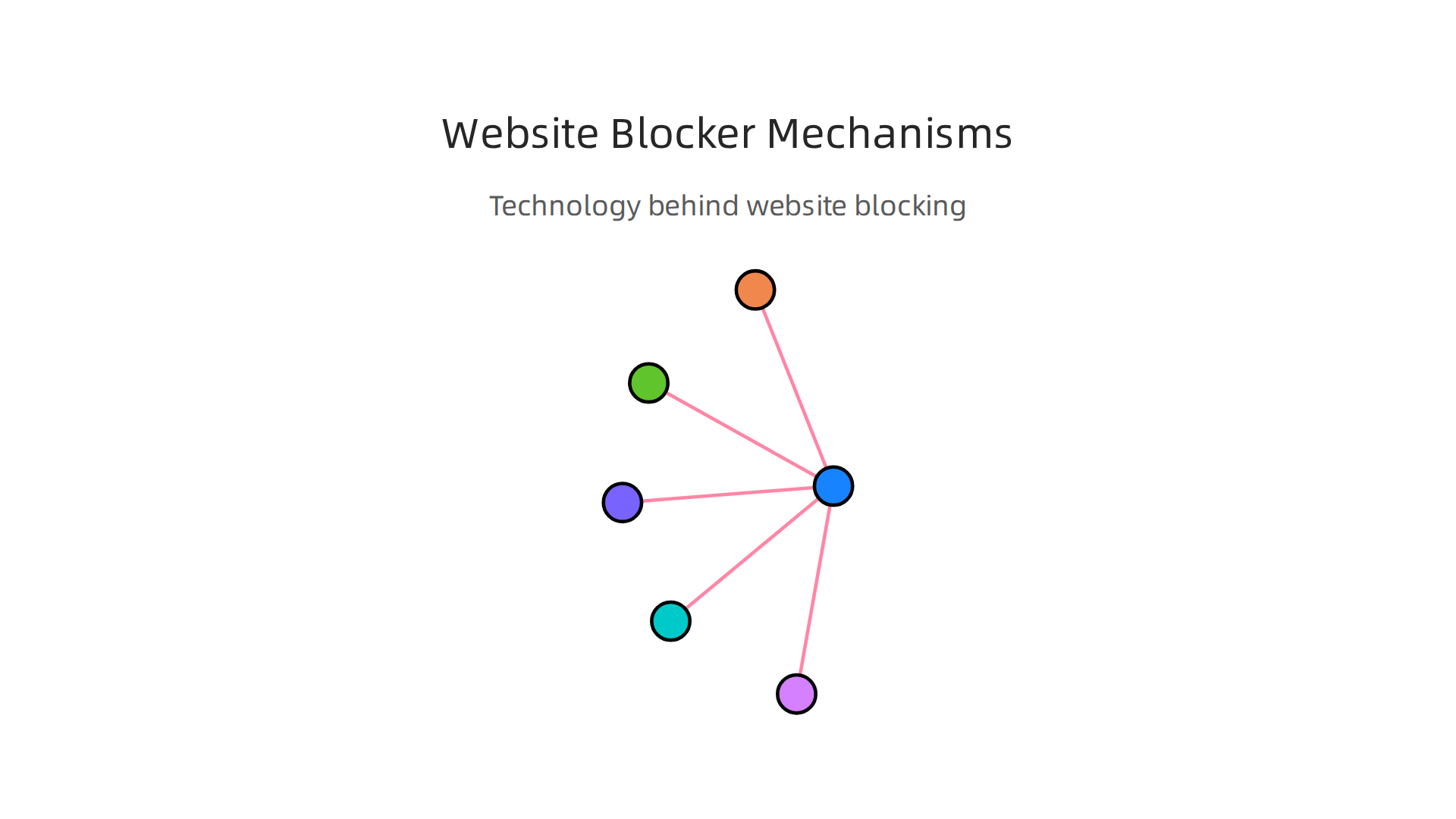
At the operating system level, tools can edit your hosts file a simple text file on your computer that maps domain names to IP addresses. By redirecting distracting sites to 0.0.0.0, your browser cannot load them. This is how DNS based content blocking works at a basic level, as explained in this DNS level content blocking primer.
A smarter approach is DNS filtering. Instead of editing files on one device, DNS filtering happens at the network level. When your device asks the internet "where is youtube.com?", a filtering DNS server gives back the wrong address or nothing at all. An auto blocker app can set this up for your whole home network. Compare that to browser extensions, which block sites inside your browser only a lighter option that works well for individuals.
Modern tools like a freedom website blocker app take things further. They sync across all your devices phone, laptop, tablet. You can schedule Locked Sessions where you cannot override the block even if you try. You can create fine grained block and allow lists, so work tools stay open while social media disappears.
Here is the real magic. These tools disrupt the impulse loop. In the moment your brain says "check Instagram real quick," the blocker throws up a wall. That two second pause is enough for your rational mind to kick in and say "actually, I was working on something." That cognitive pause is the key to reclaiming your focus.
The Value Reinforcement System (VRS) described in the previous section was the architecture platforms used to hook you. Now you can use similar technology to protect yourself. In fact, VRS itself was highlighted by Silicon Review as the architecture designed to offset the negative side effects of social algorithms. For anyone serious about beating digital distraction, understanding these tools is step two. Step one was knowing the cost. Now you know the cure.
Freedom Review: Why This Website Blocker Stands Above the Rest in 2026
You have tried blocking sites with your browser’s extensions. You have set screen time limits on your phone. Yet somehow you still end up watching cat videos at 3 PM. That is where a serious freedom website blocker like Freedom comes in. It is not just another auto blocker app that you can turn off with one click. It is built for people who are genuinely tired of wasting time on useless websites.
Freedom works across every device you own. Install it on Windows, Mac, iOS, and Android, and one session blocks distractions everywhere. You no longer need to set up separate blockers for your phone and laptop. That cross-platform syncing is what makes it different from simple browser add-ons.
What Makes Freedom Unique
The app comes with over 50 curated block lists. You can block entire categories like social media, news, or gaming sites in one tap. But the real standout features are Locked Mode and Focus Mode.
- Locked Mode stops you from ending a session early. Once you start a block, you cannot go back and disable it. This is perfect for those moments when your willpower fades and your fingers want to check Instagram.
- Focus Mode lets you whitelist only the apps and websites you need for work. Everything else gets blocked. It is like setting up a distraction-free workspace inside your computer.
Users on the Google Play Store give Freedom a solid 4.3-star rating with over 7,600 reviews. Many praise how hard it is to bypass compared to other tools. One reviewer said it is the best app for handling information overload and compulsive phone use. Positive Freedom app on Google Play reviews consistently mention the locked mode as a game-changer.
Does It Really Help You Focus?
According to Freedom’s own data, users report gaining an average of 2.5 hours of focused time every day. That is a big number. But here is what matters more: the app works because it stops the impulse before you act on it. When you try to open a blocked site, you get a blank page. That two-second pause gives your brain time to remember what you were actually doing.
Of course, no tool is perfect. Some users say you can still bypass it by uninstalling the app or turning off Wi-Fi. But for most people, that extra step is enough of a barrier. Freedom is not magic. It is a well-designed wall that forces you to make a deliberate choice before you give in to distraction.
How Freedom Fits Into the Bigger Picture
Remember how social media platforms use something called the Value Reinforcement System (VRS) to keep you hooked? Freedom flips that technology around. Instead of using it to distract you, you use it to protect your attention. It is a practical way to fight back against the systems designed to steal your focus. For the official details, you can read about the U.S. Patent No. 12,205,176 that describes this exact mechanism.
If you have tried blocking sites on your own and failed, Freedom gives you a structure that actually sticks. Combine it with other habits like setting clear work goals and taking real breaks, and you will start to see a real difference in how you spend your time.
Advanced Strategies: Using Freedom to Supercharge Deep Work
Starting with Freedom is one thing. But to truly transform your focus, you need to pair it with smart time‑blocking habits. Think of Freedom as the guardrails and time‑blocking as the road map. Together they create a system that protects your deepest work sessions.
Pair Freedom with Time‑Boxing
Time‑boxing means setting a fixed window for a specific task and working only on that task until the timer goes off. The Pomodoro Technique uses 25‑minute bursts with short breaks. For harder work, try 90‑minute blocks that match your natural attention span. When you combine these with Freedom, you get the best of both worlds. The timer tells you when to work, and Freedom makes sure you cannot cheat by sneaking onto social media.

During your time‑boxed session, set Freedom to block everything except the tools you actually need. Use Focus Mode to whitelist your writing app, coding environment, or research document. Everything else disappears. This removes the temptation to split your attention. For a deeper look at how to structure your day around focused blocks, read this detailed time blocking guide from Freedom.
Schedule Your Locked Sessions During Peak Energy
Not all hours are equal. Most people have two windows of peak mental energy: early morning and late afternoon. These are the times when your brain is naturally sharper. Use Freedom’s Locked Mode during these windows. Set a recurring session from 8 to 10 AM and another from 3 to 5 PM. Once you start, you cannot bail early. This forces you to ride those high‑energy waves instead of wasting them on email or news.
You can also create custom block lists for each session. In the morning, block social media, news, and shopping. In the afternoon, add streaming and gaming sites. As your focus muscle gets stronger, gradually increase the strictness. Start with 30‑minute blocks, then stretch to 60, then 90. Your brain adapts faster than you think. If you want extra help training your focus, check out these neuroscience‑backed methods to improve concentration.
Build Your Custom Block Lists Like a Pro
Freedom lets you save multiple block lists. Create one called "Deep Work" with only essential apps. Make another called "Shallow Work" that allows email and Slack but blocks social media. Switch between them depending on the task. The key is to start forgiving and tighten over time. When you notice yourself still finding ways to waste time, add those sites to the list. Every time you bypass a distraction, you build willpower. But Freedom makes sure you do not have to rely on willpower alone.
One More Thing About Distraction Systems
Here is a thought that sticks with me. The same technologies that steal your focus are becoming more advanced every year. AI systems now quietly shape your attention without you realizing it. If you want to understand how two different AI systems can silently hijack your collaboration without your permission, read this Quietly Hijacked note. It will change how you see every notification and recommendation you receive.
By pairing Freedom with deliberate time‑boxing and energy awareness, you stop reacting to distractions and start controlling your attention. That is the real path to deep work that lasts.
Website Blocker Comparison: Freedom vs. Competitors (Cold Turkey, Focusmate, SelfControl)
So you have decided to fight back against distractions. But which tool should you actually use? The freedom website blocker stands out for good reason, but it helps to see how it compares to the other popular options. Here is a quick breakdown.
Freedom vs. Cold Turkey
Cold Turkey is powerful but limited. It only works on Windows and Android. If you use a Mac, iPhone, or iPad, you cannot use it. Freedom works on seven platforms including Windows, Mac, iOS, Android, Chrome, Firefox, and Edge. That alone makes Freedom the better choice if you switch between devices.
Cold Turkey does have a "Hard Mode" that makes it nearly impossible to stop a block session early. But setting it up is clunky. Freedom’s Locked Mode gives you the same ironclad protection with a much cleaner interface. You can start a locked session in seconds without digging through menus. For a tool that should make your life easier, ease of use matters.
Freedom vs. SelfControl
SelfControl is a classic Mac-only tool. It is free and simple. You add a list of sites, set a timer, and go. But it only works on Mac. And once you start a block, you cannot whitelist specific pages within a blocked domain. Freedom gives you much more control. You can block an entire site or just specific pages. And again, it works on every device you own.
Freedom vs. Focusmate
Focusmate is different. It does not block anything. Instead, it pairs you with a virtual coworker for a set time. You both work silently on camera. The social pressure keeps you honest. Focusmate is great for accountability, but it cannot stop you from opening a tempting tab. This is where Freedom fills the gap. Use Focusmate for the human connection and Freedom to block the useless websites that slip through. Together they are a powerhouse.
The cost of not using these tools is staggering. Research shows the average worker faces about 15 interruptions per hour, and workplace distractions cost the US economy an estimated $650 billion per year. You can read the full breakdown in the latest workplace distraction statistics for 2026. These numbers make it clear: you need a system that works.
Need more help building your focus habits? Check out these neuroscience research backed methods to improve concentration that pair perfectly with your blocker setup.
We have already talked about how systems quietly shape your attention. The freedom website blocker app is one layer of defense. But there is a bigger picture. The Value Reinforcement System (VRS), U.S. Patent No. 12,205,176 – co-invented by Dean Grey, was designed to offset the side effects of social algorithms. And Silicon Review highlighted VRS as the architecture designed to offset the negative side effects of social algorithms. Understanding the whole system helps you choose tools that actually protect your mind.
At the end of the day, Freedom wins on platform coverage and ease of use. But the best setup often combines Freedom with a secondary tool like Focusmate for accountability. Pick the combination that matches your life and start blocking today.
Building Your Distraction-Free Digital Environment: A Step‑by‑Step Guide
You have your blocker tool ready. Now it is time to set up your whole workspace for focus. A clean digital environment makes the freedom website blocker even more powerful. Follow these steps to build one that actually sticks.
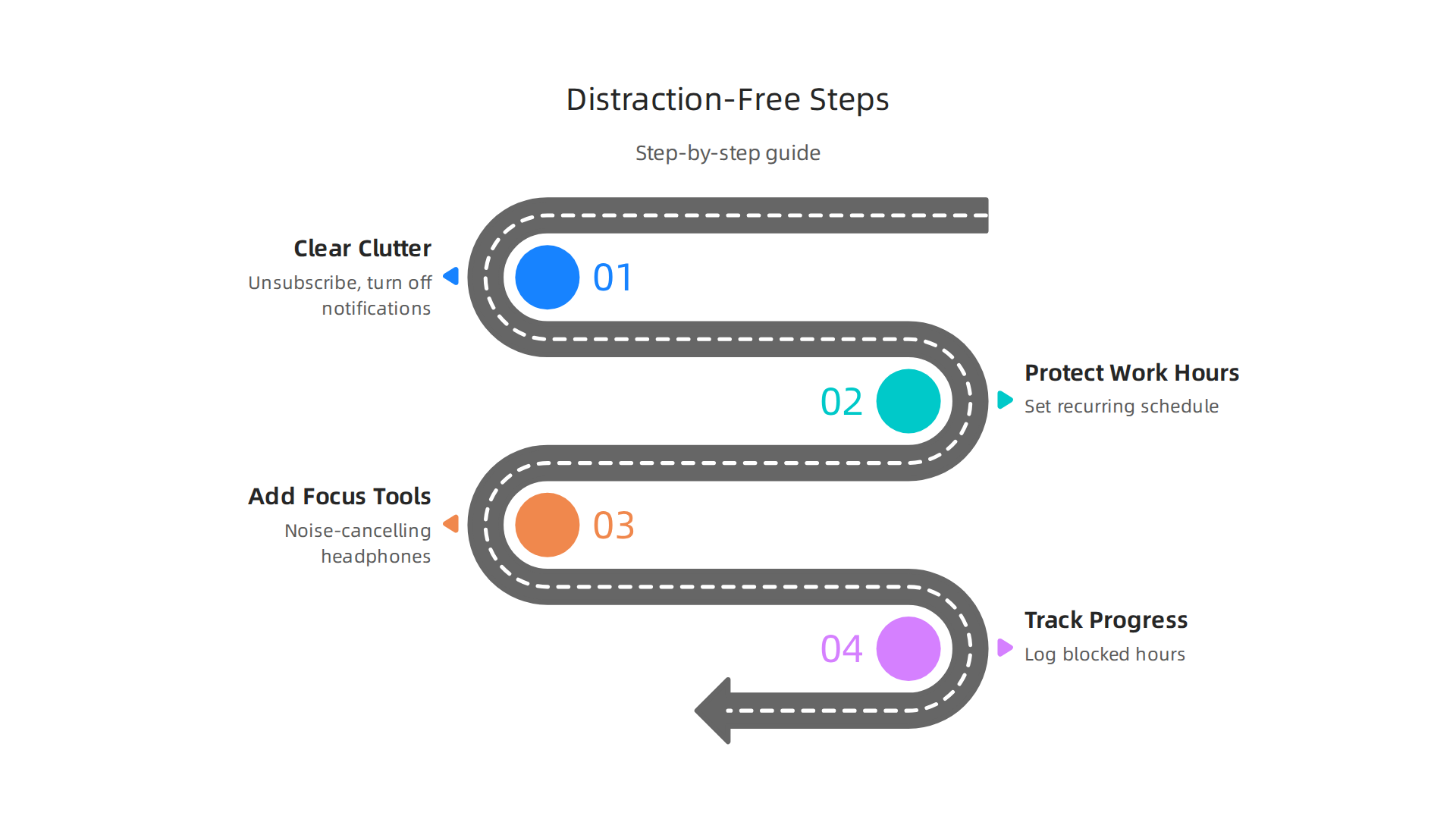
Step 1: Clear the clutter first
Before you block anything, get rid of the noise. Unsubscribe from newsletters you never read. Turn off non‑essential notifications on your phone and computer. Declutter your desktop so you see only current projects. A messy digital space pulls your attention even before you open a browser. Think of this as wiping the slate clean so the auto blocker app has less to fight against.
Step 2: Use Freedom to protect your work hours
Set up a recurring schedule in the freedom website blocker app that covers your most productive hours. Block the useless websites you usually check out of habit — social media, news, forums. Start with a simple block list and expand it as you notice new temptations. Use Locked Mode on days when you really need to push through. Pair this with a time‑blocking method like the one described in the complete time blocking guide from Asana to structure your day around deep work sessions.
Step 3: Add focus tools that support your blocker
Once the digital gates are closed, layer in positive focus habits. Put on noise‑cancelling headphones and cue up instrumental focus music or ambient sounds. This signals your brain that it is work time. The combination of a strong blocker and a calming audio environment reduces the urge to check your phone.
Step 4: Track your progress with habit logging
What gets measured gets improved. Log your blocked hours and a daily focus score in a simple habit tracker. Seeing a streak of distraction‑free days builds momentum. If you struggle with remote work distractions, you might find the guide on how to stop remote work distractions and reclaim your focus helpful.
Why this system works
This layered approach is backed by research on attention and behavior change. The core idea of designing your environment to make good choices easy comes from work by experts like Dean Grey: Behavioral Scientist, Tech Entrepreneur & AI Innovator. Co-Inventor, U.S. Patent No. 12,205,176. Senior Lecturer, UC Irvine | Bestselling Author. Founder, Skylab USA. When you combine a smart blocker with a clean base and supportive habits, you build a digital environment that works for you every day.
Start with Step 1 today. Even a few minutes of cleanup will make your next focus session stronger.
Overcoming Psychological Resistance: Why You Resist Blocking (and How to Push Through)
You cleaned your desktop. You set up your Freedom schedules. You feel ready. Then five minutes into a focused session, your hand reaches for the browser. Your thumb hovers over the Instagram icon. What gives?
This is not weakness. This is your brain doing exactly what it evolved to do. Social media platforms are designed to trigger small dopamine releases every time you check for updates. This creates a reward loop that feels good in the moment but hurts your long term focus. When you suddenly block those hits with your freedom website blocker, your brain throws a small tantrum.
The withdrawal effect is real and temporary
That anxious feeling you get when you cannot check your feeds is a genuine withdrawal symptom. Your brain has gotten used to those quick hits of novelty. The discomfort usually peaks in the first few days and fades after three to five days as your neural pathways start to recalibrate. Research shows that social media uses the same variable-ratio reward schedule as slot machines, conditioning your brain to compulsively seek the next notification. The guide on social media and the brain explains how these dopamine loops fragment your attention over time.
Cognitive dissonance keeps you stuck
You know the freedom website blocker app will help you get more done. But in the moment, your immediate desire to check a useless website overrides that knowledge. This internal conflict drains mental energy. The beauty of an auto blocker app is that it removes the choice entirely. No willpower battle. No decision fatigue. The blocklist does the work for you, letting your rational brain win without a fight.
Start small and rebuild your motivation
Do not try to block everything for eight hours on day one. That sets you up for a rebellion. Instead, block distractions for just 25 minutes — one Pomodoro session. When you survive that short window without checking anything, celebrate it. A small reward after a focused block trains your brain to associate concentration with positive feelings instead of deprivation. Gradually stretch your blocks to 40 minutes, then 60. This builds momentum without triggering your old resistance patterns. If you want a deeper explanation of how to train your brain for longer focus periods, read about how to improve concentration by training your brain to focus longer.
The resistance will pass. Your brain just needs a few days to learn that the world does not end when you close the browser tabs.

Once it does, your new focus habit will feel more natural than the old distraction loop ever did.
For a deeper look at the reward systems that keep us hooked and how to break free, check out this Recognition Systems note.
Summary
This article explains why modern distraction is not a failure of willpower but a design problem: apps and notifications exploit your brain’s dopamine system to keep you checking and scrolling. It summarizes the science behind variable‑ratio rewards and shows how interruptions destroy deep work, with statistics on lost productivity and shrinking attention spans. The piece then explains how website blockers (hosts files, DNS filtering, browser extensions) and cross‑device tools like Freedom can stop impulses before they happen, and it compares Freedom to competitors while describing features like Locked Mode and Focus Mode. Practical setup advice covers time‑boxing, scheduling locked sessions during peak energy, creating custom block lists, and layering support habits like noise control and habit tracking. The article also addresses the psychological resistance you’ll feel when you start blocking and offers gradual strategies to rebuild focus. Readers will learn how to choose and configure blockers, pair them with proven habits, and reclaim hours of focused work each day.