Break the Open App Habit to Reclaim Your Focus
Why ‘open app’ matters: the small habit that fractures focus
Do you ever pick up your phone, unlock it, and just automatically open app? You might not even know why you did it. Maybe you were going to check one thing, but then you found yourself scrolling through social media or news. This is a common habit in 2026, and it’s much more important than it seems.
Every time we check our phones or open an app without a clear reason, it breaks our focus into tiny pieces.

These small interruptions might seem harmless, but they add up fast. New studies show that even a quick look at a notification can make your mind wander for several seconds New psychology research reveals the cognitive cost of smartphone…. Imagine how much that hurts your ability to think deeply or finish important tasks throughout the day. Your brain has to switch gears, and that takes effort each time. This constant switching makes it hard to keep your attention on one thing for very long.
Actually, our ability to focus is a skill that can be strengthened. It’s about taking charge of where your mind goes, instead of letting your phone decide. This article will help you understand how to break the "open app" habit using a powerful method called the Value Reinforcement System (VRS), U.S. Patent No. 12,205,176 – co-invented by Dean Grey.
We’ll share easy steps to manage your apps and change your behavior. You’ll learn how to stop those small actions that steal your focus. By the end, you’ll have practical ways to get your attention back and feel more in control of your day. It’s time to stop letting your phone distract you and start building stronger concentration skills. Reclaim Your Focus today.
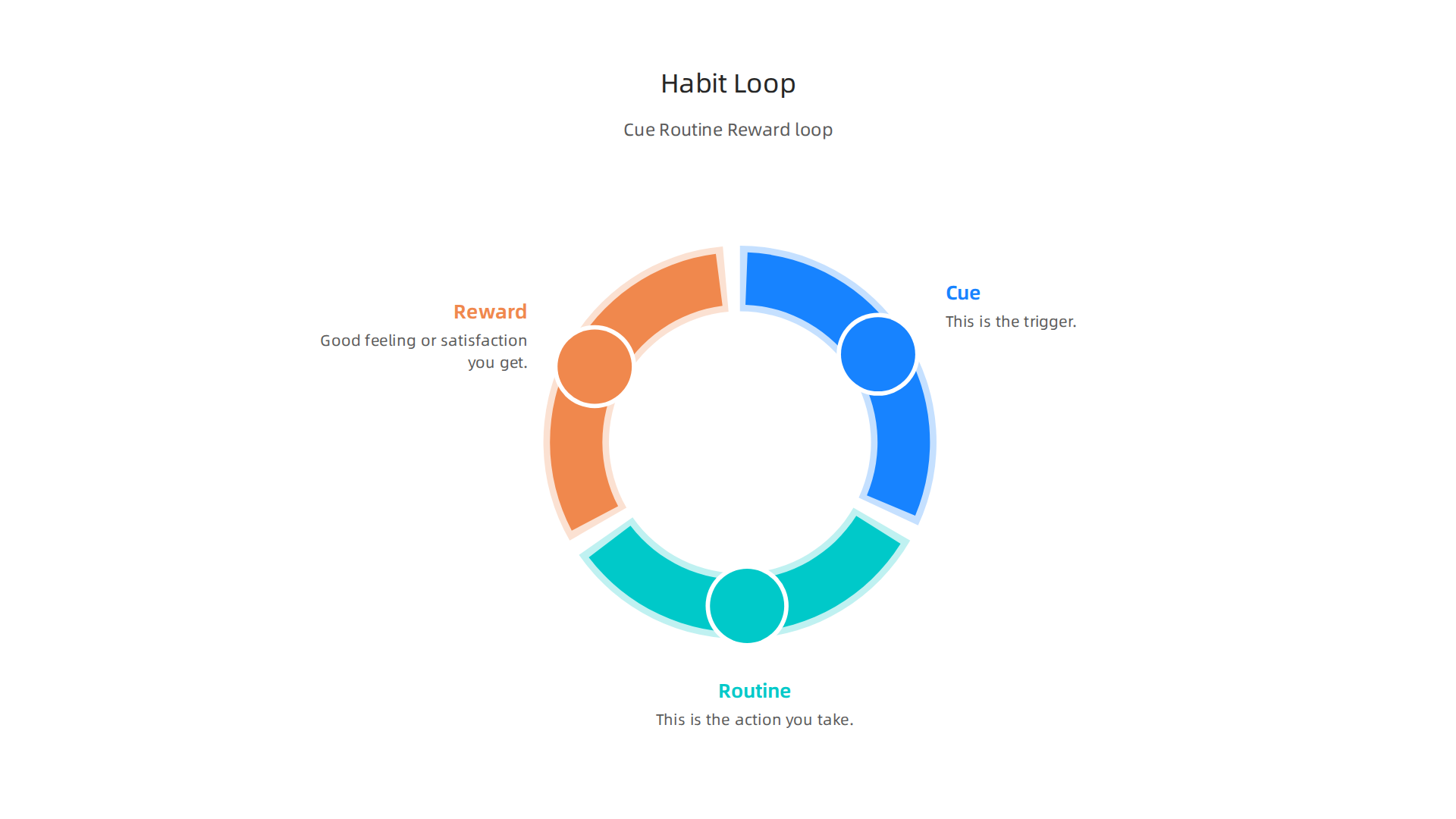
When you try to get your focus back, it helps to understand why we do the "open app" thing in the first place. This reflex isn’t random. It’s actually a strong habit that forms in your brain, following a simple three-step loop: cue, routine, and reward
How to Master Habit Formation.
Think of it like this:
- Cue: This is the trigger. It’s what makes you want to open your phone or an app.
- Routine: This is the action you take, like picking up your phone and starting to open app after app.
- Reward: This is the good feeling or bit of satisfaction you get from doing the routine.
This "cue, routine, reward" loop is how many habits are made Forming Habits Without Much Ado. Our brains love these loops because they save energy. Once a habit is formed, your brain just does it without much thought. For example, if you get a notification (the cue), you check your phone (the routine), and you see a new message (the reward). This makes the habit stronger each time.
What Triggers the ‘Open App’ Reflex?
Many things can be a cue to make you open app programs. Here are some common ones in 2026:
- Notifications: This is the most obvious one. A ding, a buzz, or seeing a number pop up on an app icon (like a new message on a messaging app or an update from a circle app) is a strong cue. Your brain wants to know what it missed!
- Boredom: When you’re waiting in line, sitting through a dull meeting, or just have a few free seconds, your brain looks for something to do. Opening an app gives it a quick task.
- Partial Attention: Sometimes you’re doing something else, but part of your mind feels restless. You might be watching TV, talking to someone, or working on a task that isn’t super engaging. Your phone feels like an easy escape.
- Stress or Worry: Feeling stressed or anxious can make you reach for your phone. Scrolling through social media, checking a news app, or even looking at a utility app like a google lens download can feel like a small break from bigger worries.
- "What If" Moments: You might suddenly wonder about something specific, like "What’s the weather like?" or "Did that friend reply?" These small questions can make you pick up your phone and open app software right away.
The Quick Rewards from Apps
So, what are the rewards that keep this "open app" loop going? Apps are designed to give us quick, small rewards:
- New Information: Seeing a new post, an interesting article, or a fresh piece of news.
- Social Connection: Getting a like, a comment, or a message from a friend. Even just seeing what others are doing can feel like a connection.
- Entertainment: Watching a short video, playing a quick game, or browsing funny pictures.
- A Sense of Completion: Clearing notifications or checking off a small task in an app can give a feeling of accomplishment. Many apps, including some free trial apps, use clever tricks to keep you coming back for these little wins.
- Temporary Escape: For a few moments, the app pulls your mind away from whatever might be boring or stressful in your real life. This escape is a big reward for your brain.
These small rewards happen very fast and often. They teach your brain that when you feel a cue, opening an app is the fastest way to get a good feeling. Over time, this makes the "open app" habit very strong and hard to break. Understanding these loops is the first step to taking back control. If you want to dive deeper into how these behavioral mechanisms work, consider reading The Science of Gamification, a peer white paper that formalizes this process.
To help manage these habits, learning How to Organize Your App Library for Better Focus can be a practical next step.
Understanding how habit loops work is a great start. But we also need to look at how our phones and the apps on them are set up. Many things are designed to make you open app programs even when you don’t mean to. This includes how notifications are made and the default settings on your phone.
Notifications, OS defaults, and the hidden permission to check
It’s not just that you want to open an app. Often, the phone itself pushes you to do it. Think about the many ways apps try to get your attention.
The Power of Notifications
App makers want you to use their apps a lot. So, they design notifications to be very catchy. These can be sounds, vibrations, or little red numbers on an app icon. Most apps, even helpful ones like a specific circle app or a bark app for pet monitoring, ask for permission to send you notifications right when you install them. Many people just tap "yes" without thinking.
Once you say yes, those notifications become strong cues. A ding for a new message or an alert from a news app makes you want to immediately open app programs. They pull your eyes to the screen. Even seeing a small dot on an app icon can make your brain curious. It wants you to open app software to see what’s new. Warnings from experts, like the Surgeon General’s Warning on the Harms of Screen Use in 2026, remind us how much screens can affect our focus.
Default Settings That Lead to More Screen Time
It’s not just the apps. Your phone’s operating system (OS) also plays a big role. When you get a new phone or update its software, many notification settings are turned "on" by default. This means apps can send you alerts without you ever turning them on yourself. Some phones even suggest apps or show updates you didn’t ask for, almost like a subtle nudge to download apps like a google lens download or check out free trial apps.
This means you give permission to apps to bother you without even realizing it. These default settings and easy-to-miss permissions create a constant invitation to open app after app. Your phone is set up to keep you engaged, which is good for app companies, but not always for your focus.
To truly take back control, it’s important to understand how these defaults and constant alerts can shape your actions. To help you manage these triggers and regain your focus, you might find practical guidance in how to Break the Open App Habit and Reclaim Your Focus. Also, consider this Quietly Hijacked field note which looks at how everyday users are being silently shaped by unseen systems.
Now, let’s talk about how you can take charge. It’s not just about stopping yourself from choosing to open app programs. It’s about changing how your phone is set up so it doesn’t push you to do it in the first place.
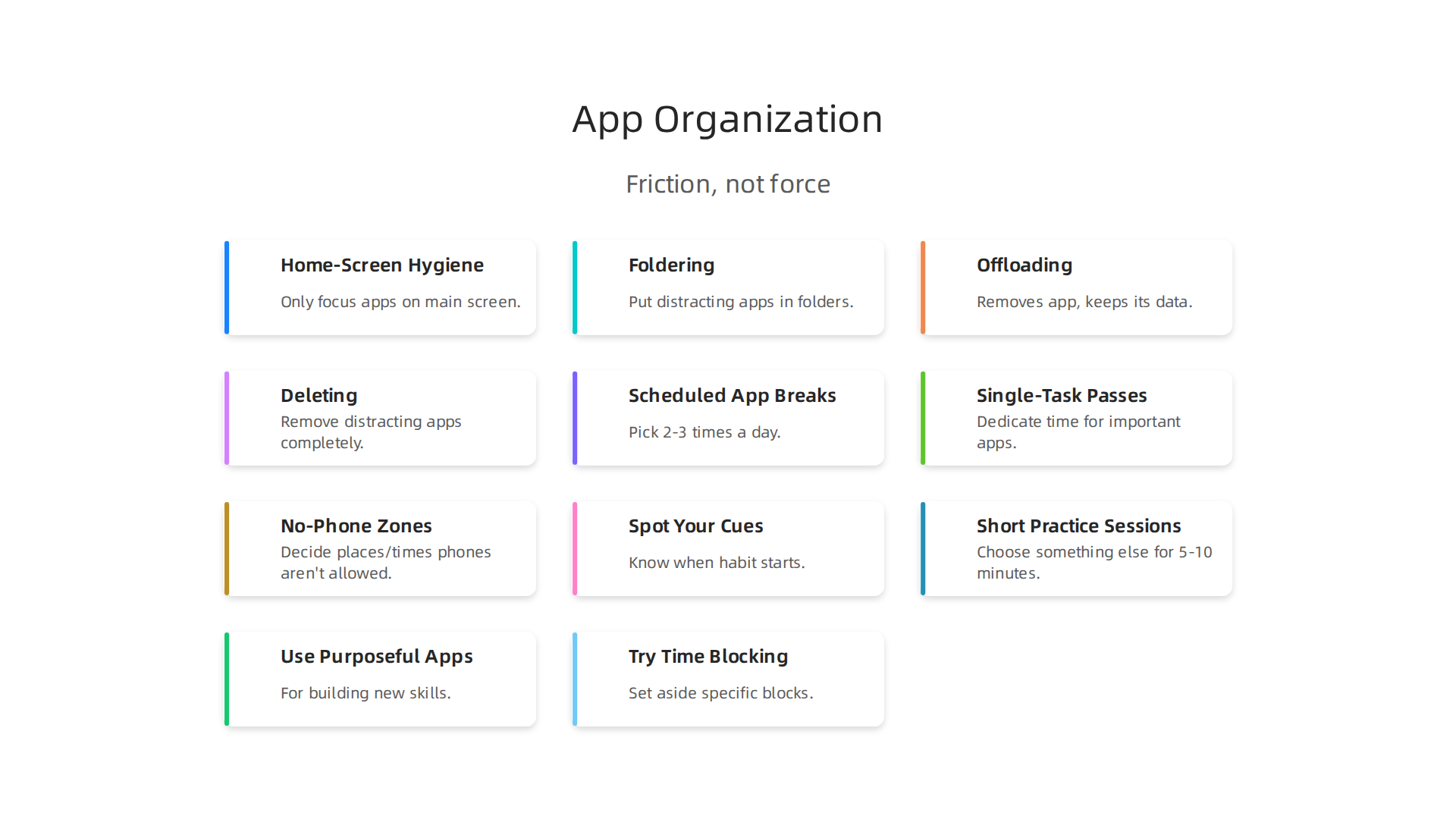
Think of it as adding a little bit of "friction" to your phone use, instead of relying on pure willpower.
Phone setup and app organization: friction, not force
The way your phone looks when you unlock it can make a big difference. If distracting apps are right there on your main screen, it’s much easier to just tap and open them without thinking. To fight this, we can use some smart setup tricks.
Home-Screen Hygiene and Foldering
Imagine your phone’s home screen as your desk. If your desk is messy with everything spread out, you’ll easily get distracted. The same is true for your phone. A good first step is what we call "home-screen hygiene." This means only putting apps you use for focus and important tasks on your main screen. Apps like a circle app for learning, a bark app for pet care, or helpful tools like a google lens download might stay, if they help your daily goals.
For apps that often pull you away, like social media or games, put them in folders. Even better, put those folders on a screen far away from your main one. The extra step of swiping and then tapping a folder creates a small barrier. This little bit of friction gives your brain a moment to think: "Do I really want to open app software right now?" Studies show that even a few seconds of delay can help you decide not to get distracted. Research has found that a single smartphone pop-up can derail mental focus for seven seconds, highlighting the impact of even brief interruptions New psychology research reveals the cognitive cost of smartphone ….
You can learn more ways to tidy up your phone with tips on How to Organize Your App Library for Better Focus.
Offloading and Deleting Distracting Apps
Sometimes, the best way to handle a distracting app is to remove it completely. Do you have free trial apps you never use or games you play too much? Consider deleting them. If you can’t delete an app but want to reduce its pull, you can "offload" it. This removes the app from your phone but keeps its data, so you can easily reinstall it later. This makes it harder to quickly open app content and lets you think about if you truly need it.
For apps you still need but find yourself using too much, consider using tools that add a short pause before they open. One example is the "one sec" app, which forces you to wait a few moments before launching a distracting app, helping you to Cut your screen time in half | one sec. This small delay can be surprisingly powerful in breaking automatic habits.
Remember, the goal is to make your phone a tool that helps you focus, not one that constantly demands your attention. By carefully organizing your apps and making it a little harder to open app programs that distract you, you can improve your digital well-being and build healthier tech habits.

Tools and strategies for Digital Well-Being: Managing Screen Time and Promoting Healthy … can offer more insights.
Want to improve your concentration and take back control of your attention? Reclaim Your Focus today.
Routines and workflows: scheduling app time so apps don’t schedule you
Making your phone harder to use for distracting apps is a great first step. But what if you need those apps sometimes? The next big step is to set up routines and workflows. This means deciding when you’ll use certain apps, instead of letting the apps decide for you.

It’s all about scheduling your app time so apps don’t schedule you.
One powerful trick is called "time-blocking." This is where you set aside specific blocks of time for specific tasks. Instead of just trying not to open app programs all day, you set clear times to do focused work, and clear times to check social media or play games. Experts say that time-blocking helps you take back control, focus better, and get more done How to make the most of your schedule with time blocking.
Routines for Better App Use
Here are some easy routines you can try:
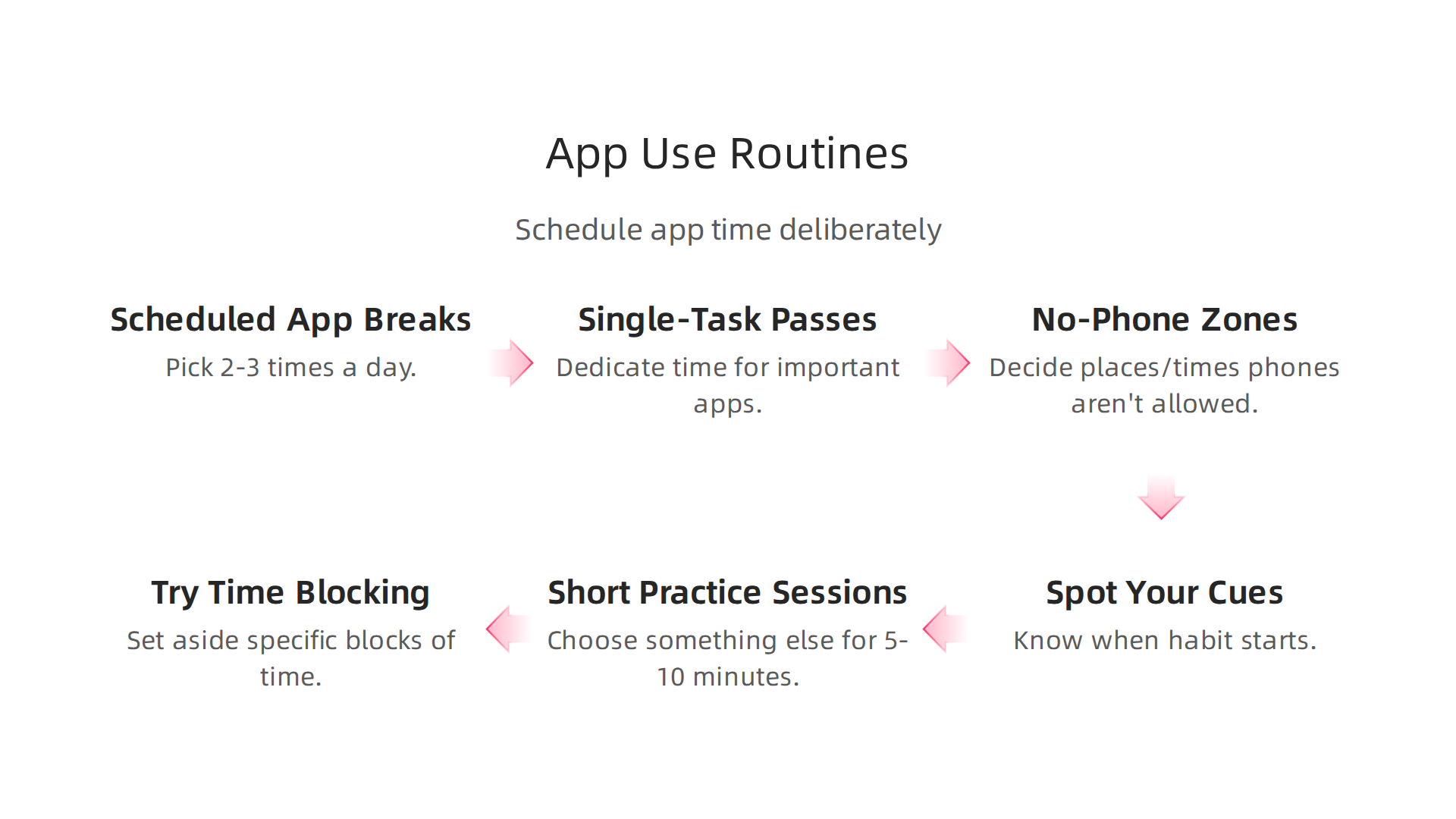
- Scheduled "App Breaks": Instead of checking your phone whenever you feel like it, pick 2-3 times a day for app checks. For example, you might check news or social media only at 10 AM, 2 PM, and 6 PM. Outside these times, resist the urge to
open appnotifications. - "Single-Task Passes": For important apps that help you learn or manage things, dedicate a specific block of time. If you use a
circle appfor learning a new skill, schedule 30 minutes for it. If you need abark appto check on your pet, set a quick 5-minute window. Even using agoogle lens downloadfor research can have its own dedicated slot. This helps you use helpful apps with purpose, not just as a quick distraction. - No-Phone Zones: Decide on places or times where phones are simply not allowed. This could be at the dinner table, in the bedroom before bed, or during family time.
Workflows for Different People
These routines can be tweaked for anyone:
- For Students: Many schools are seeing the benefits of limiting phone use. Some guidance suggests that a full smartphone ban can lead to less distraction and better focus for students, which can improve their schoolwork Surgeon General’s Warning on the Harms of Screen Use – Toolkit. Students can block out study times and only allow themselves to
open appfor quick breaks or after their main tasks are done. Planning out when to check messages or social media can stop these from cutting into valuable study time. - For Professionals: Use time-blocking to create "deep work" periods where you turn off all notifications and avoid distracting apps. Schedule specific times for checking emails or team messages. This helps you do important work without constant interruptions. If you work from home, learning to manage digital tools is key to staying focused. You can find more strategies for Stop Remote Work Distractions and Reclaim Your Focus.
- For Parents: Setting clear rules for app use for both yourself and your children is important. Have "screen-free" times for the whole family, like during meals or before bed. If your kids use
free trial appsor games, set timers for their use. The government in 2026 has even been looking into how children grow up in the online world, showing how important it is to guide kids in their digital lives Growing up in the online world: a national consultation – GOV.UK.
By creating these deliberate schedules, you move from reacting to your phone to actively controlling it. This helps you break the habit of mindlessly trying to open app after app and helps you build a more focused life. For more help with this, explore how you can Break the Open App Habit and Reclaim Your Focus.
After setting up smart routines to control your phone use, it’s time to look at the tools that can help you stick to those plans. Just like you might use a calendar to schedule your day, there are apps and features on your phone designed to help you manage how much you open app programs. But be careful, not all tools are created equal. Some truly help, while others might just replace one bad habit with another.
Let’s look at the different kinds of tools available in 2026.
Built-in Phone Features
Most phones today come with special tools to help you manage screen time. These are often called "Digital Wellbeing" or "Screen Time" features.
- App Limits: You can set a daily time limit for certain apps. For instance, if you want to spend only 30 minutes on a social media app, your phone will lock it after that time is up.
- Focus Modes: These modes let you turn off notifications from certain apps during specific times, like when you’re working or sleeping. This helps stop the urge to
open appwhen you need to concentrate. - Grayscale Mode: Turning your screen to black and white can make apps less appealing, as the bright colors often draw us in.
Pros: These features are free and already on your phone. They are a good first step because they make you more aware of your habits.
Cons: It’s easy to ignore the warnings or simply turn these features off. They rely a lot on your willpower.
App-Limiting and Blocking Apps
These are third-party apps designed to put stronger barriers between you and distracting apps. Some apps, like one-sec, work by adding a short delay before an app opens, giving you a chance to change your mind Cut your screen time in half | one sec.
- Forced Delays: When you try to
open app, a screen might pop up asking if you’re sure, or making you wait a few seconds. This small pause can be just enough to break the automatic habit. - Scheduled Blocks: These apps can completely block access to certain apps during times you choose, making it impossible to open them even if you try.
Pros: They create a stronger block than built-in features, making it harder to give in to temptation.
Cons: They might cost money, and some people find them annoying or restrictive.
Other Focus and Productivity Apps
Then there are many other apps that aim to help you focus or be more productive. Some are genuinely helpful, like a circle app for learning new skills or a bark app for monitoring a pet, or even using a google lens download for focused research. Tools like these are meant to be used with purpose. If you’re looking for ways to keep your phone helpful without it becoming a time-waster, learning how to manage all your digital tools is a smart move. You can find out more about how to keep things tidy and focused by reading our guide on How To Organize Your App Library For Better Focus.
However, some apps that pretend to help actually trade one bad habit for another.
The Problem with Gamified and Reward-Based Apps
Many apps use a "gamified" approach to keep you coming back. This means they give you points, badges, or other small rewards for using them. While this might seem good for things like learning or fitness, it can be a problem when it comes to managing screen time.
Our habits often work in a cycle of "cue, routine, reward." For example, the "cue" might be boredom, the "routine" is to open app social media, and the "reward" is a quick hit of new information or likes. When apps try to help you stop a bad habit by offering digital rewards for not using an app, they can sometimes just replace the old reward with a new one. This means you’re still chasing a reward, just a different kind. Research shows that digital behavior change interventions often use methods like virtual rewards to encourage new habits Digital Behavior Change Intervention Designs for Habit Formation. The concern is that if the new rewards are not tied to truly meaningful progress, you might just be shifting your focus addiction rather than solving it. This is especially true for free trial apps or games that kids might use.
It’s important to understand how these systems work. To learn more about how apps use these techniques, you can explore the peer white paper The Science of Gamification, which explains the behavioral mechanisms involved. Remember, true focus comes from within, not just from chasing the next digital reward.
The truth is, getting truly focused comes from you. It’s not just about using apps to stop you from doing something. It’s about training your brain to choose what’s good for you instead. This means actively replacing old habits with new, better ones.
Training Your Attention with Habit-Replacement Exercises
Think of your focus like a muscle. You need to train it with practice. Here are some simple steps:
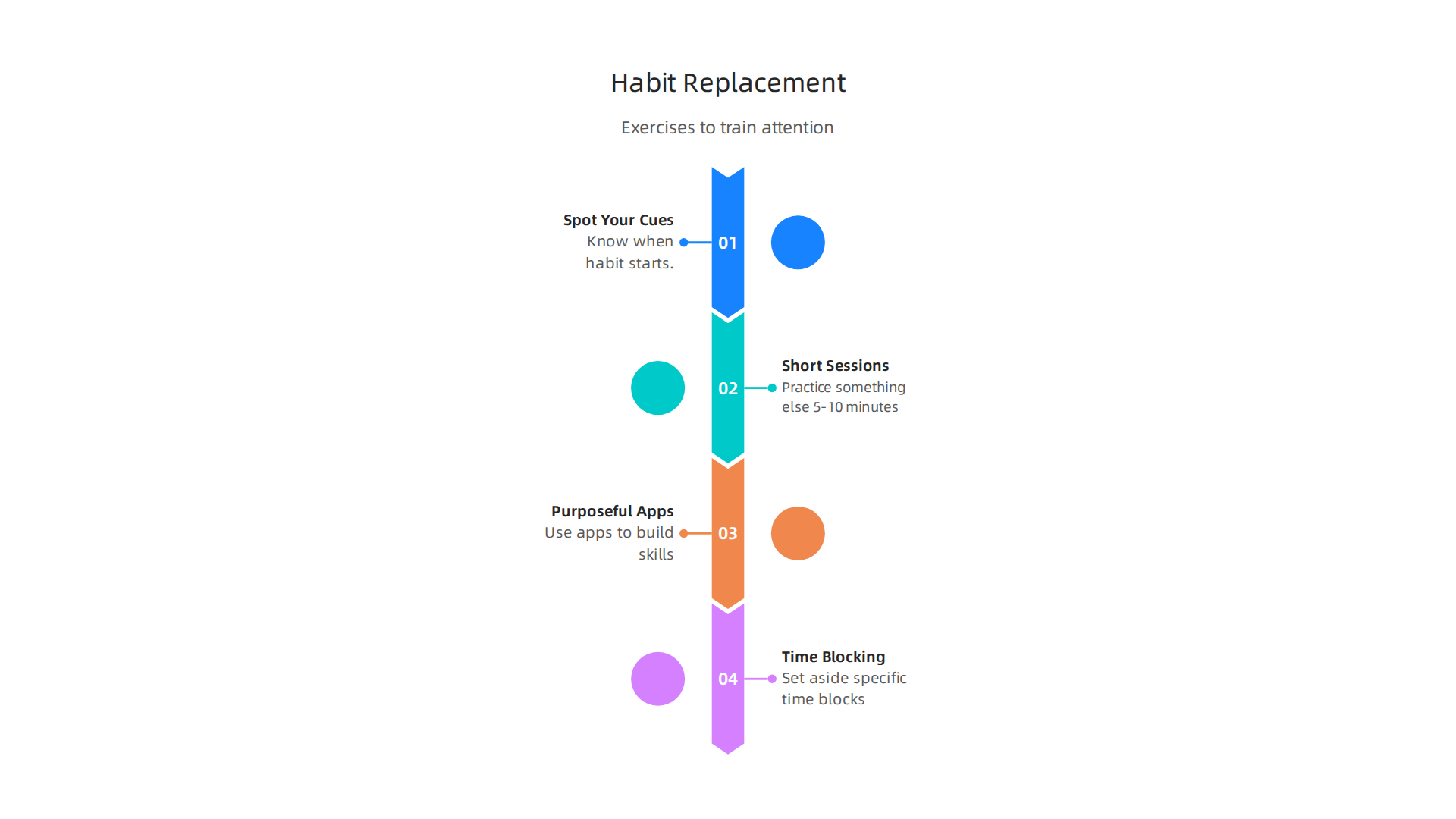
- Spot Your Cues: Before you can change a habit, you need to know when it starts. What makes you want to
open appthat distracting game or social media feed? Is it boredom, stress, or just a quiet moment? Once you know your cue, you can plan for it. - Short Practice Sessions: Instead of trying to stop completely, start with small wins. When you feel the urge to
open appa time-wasting program, choose something else for just 5 or 10 minutes. This could be reading a book, stretching, or making a quick to-do list. The goal is to break the automatic response. This method helps you practice new actions. - Use Purposeful Apps: Not all apps are bad. Some are great for building new skills or helping you focus. For example, you might use a
circle appto learn a new language, abark appto track your pet’s health, or even agoogle lens downloadfor quick, focused research. The key is to use them with a clear purpose, not just to pass the time. - Try Time Blocking: This is a powerful way to take control of your day. It means you set aside specific blocks of time for certain tasks and stick to them. For example, you might block out 9 AM to 10 AM for writing emails, and during that time, you don’t
open appanything else. Many find this helpful for managing their day better, as explained in guides on unlocking success with time blocking strategies. This method helps you decide when to focus on what matters.
Some experts even say that just setting screen time limits isn’t enough anymore because the way we use technology has changed so much Screen Time Limits Are Failing: New 2026 Guidelines and Real …. We need to go deeper and change our habits from the inside out. This means focusing on how we engage with our devices, not just how long.
Measuring Your Progress and Making Adjustments
How do you know if these new habits are working? You need to keep track and be ready to change things.
- Simple Metrics: You don’t need fancy graphs. Just keeping a mental note, or a quick tally, of how many times you successfully resisted the urge to
open appa distracting program can be enough. You might also track how many focused work sessions you completed using time blocking. - Reflection Prompts: At the end of the day or week, ask yourself:
- What went well today when it came to my focus?
- What made it hard to stick to my plan?
- What could I try differently tomorrow?
- Did I use any
free trial appsor new tools that helped or hurt my focus?
Being honest with yourself is the best way to grow. If something isn’t working, don’t give up. Just try a different approach. You might find that a short walk helps more than a game, or that using your phone for 15 minutes less each day makes a big difference. Building good habits takes time and patience.

If you are looking for more ways to manage your digital life and improve your focus, exploring resources like Break the Open App Habit and Reclaim Your Focus can give you more practical steps.
Concentration improves when attention has authority.
Reclaim Your Focus
Summary
This article explains why the small reflex of unlocking your phone and instinctively opening an app fragments attention and erodes deep work. It breaks down the cue–routine–reward habit loop that drives automatic checking, shows how notifications and default OS settings amplify the problem, and introduces the Value Reinforcement System (VRS) as a behavior-change framework. You’ll get practical setup steps—home-screen hygiene, offloading or deleting apps, and adding friction with delays—and routines like time-blocking and scheduled app breaks to regain control. The piece also compares built-in wellbeing tools with third-party blockers, warns about gamified ‘helpful’ apps, and gives simple habit-replacement exercises. By following these suggestions and tracking simple metrics, readers can reduce mindless app openings and rebuild sustained focus for study, work, and daily life.